08. Testing Room
L5 P4 A07 Testing Room V3
In this step you'll write tests for your Room database's DAO.
Step 1: Add the architecture component testing library to gradle
- Add the architecture component testing library to your instrumented tests, using
androidTestImplementation:
app/build.gradle
androidTestImplementation "androidx.arch.core:core-testing:$archTestingVersion"Step 2: Create the TasksDaoTest class
- In your project pane, navigate to androidTest > data > source.
- Right-click on the source package and create a new package called local.
- In local, create a Kotlin file and class called TasksDaoTest.kt.
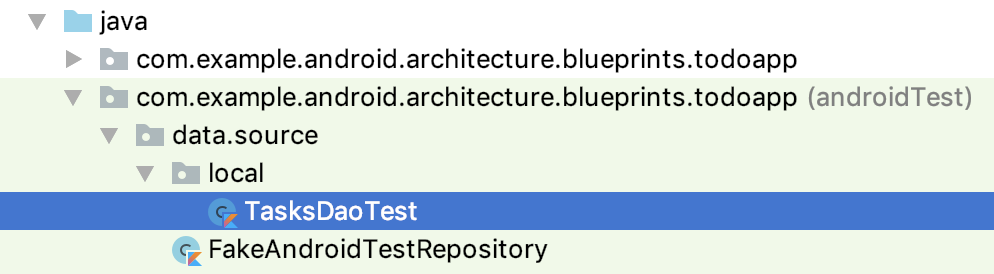
Step 3: Set up the TasksDaoTest class
- Copy the following code to start your
TasksDaoTestclass:
TasksDaoTest.kt
@ExperimentalCoroutinesApi
@RunWith(AndroidJUnit4::class)
@SmallTest
class TasksDaoTest {

    // Executes each task synchronously using Architecture Components.
    @get:Rule
    var instantExecutorRule = InstantTaskExecutorRule()

}- In
TasksDaoTest, create alateinitfield for your database:
TasksDaoTest.kt
private lateinit var database: ToDoDatabase- Make a
@Beforemethod for initializing your database:
TasksDaoTest.kt
@Before
fun initDb() {
    // Using an in-memory database so that the information stored here disappears when the
    // process is killed.
    database = Room.inMemoryDatabaseBuilder(
        getApplicationContext(),
        ToDoDatabase::class.java
    ).build()
}- Make an
@Aftermethod for cleaning up your database usingdatabase.close():
TasksDaoTest.kt
@After
fun closeDb() = database.close()
Once done, your code should look like:
TasksDaoTest.kt
@ExperimentalCoroutinesApi
@RunWith(AndroidJUnit4::class)
@SmallTest
class TasksDaoTest {

    // Executes each task synchronously using Architecture Components.
    @get:Rule
    var instantExecutorRule = InstantTaskExecutorRule()


    private lateinit var database: ToDoDatabase

    @Before
    fun initDb() {
        // Using an in-memory database so that the information stored here disappears when the
        // process is killed.
        database = Room.inMemoryDatabaseBuilder(
            getApplicationContext(),
            ToDoDatabase::class.java
        ).allowMainThreadQueries().build()
    }

    @After
    fun closeDb() = database.close()

}
Step 4: Write your first DAO test
Your first DAO test will insert a task and then get the task by its id.
- Still in TasksDaoTest, copy the following test:
TasksDaoTest.kt
@Test
fun insertTaskAndGetById() = runBlockingTest {
    // GIVEN - Insert a task.
    val task = Task("title", "description")
    database.taskDao().insertTask(task)

    // WHEN - Get the task by id from the database.
    val loaded = database.taskDao().getTaskById(task.id)

    // THEN - The loaded data contains the expected values.
    assertThat<Task>(loaded as Task, notNullValue())
    assertThat(loaded.id, `is`(task.id))
    assertThat(loaded.title, `is`(task.title))
    assertThat(loaded.description, `is`(task.description))
    assertThat(loaded.isCompleted, `is`(task.isCompleted))
}
If needed, here are the imports:
TasksDaoTest.kt
import androidx.arch.core.executor.testing.InstantTaskExecutorRule
import androidx.room.Room
import androidx.test.core.app.ApplicationProvider.getApplicationContext
import androidx.test.ext.junit.runners.AndroidJUnit4
import androidx.test.filters.SmallTest
import com.example.android.architecture.blueprints.todoapp.data.Task
import kotlinx.coroutines.ExperimentalCoroutinesApi
import kotlinx.coroutines.test.runBlockingTest
import org.hamcrest.CoreMatchers.`is`
import org.hamcrest.CoreMatchers.notNullValue
import org.hamcrest.MatcherAssert.assertThat
import org.junit.After
import org.junit.Before
import org.junit.Rule
import org.junit.Test
import org.junit.runner.RunWith- Run your test and confirm that it passes.
Step 5: Try it yourself!
Now try writing a DAO test yourself. Write a test that inserts a task, updates it, and then checks that it has the updated values. Below is starter code for updateTaskAndGetById.
- Copy this test starter code:
TasksDaoTest.kt
@Test
fun updateTaskAndGetById() {
    // 1. Insert a task into the DAO.

    // 2. Update the task by creating a new task with the same ID but different attributes.

    // 3. Check that when you get the task by its ID, it has the updated values.
}- Finish the code, referring to the
insertTaskAndGetByIdtest you just added. - Run your test and confirm it passes!
The completed test is in the end_codelab_3 branch of the repository here, so that you can compare.